A sliding window is a bounded range that moves over a sequence of elements. In leetcode, it is an algorithmic technique where you maintain a fixed- or variable-size window over an array to compute something efficiently. In production systems, a sliding window is a buffer that tracks in-flight messages – items that have been sent but not yet confirmed as processed.
These two uses share the same mental model, but there is a big difference. Leetcode functions similarly to batch processing: we have a fixed set of input that we fit through the window gradually. Real-time production systems have the issue that messages arrive whenever they want, and there is no guarantee that messages will arrive at all.
As a result, one problem is that incorrect downstream processing could lead to messages in the sliding window never being ACK-ed (acknowledged – the receiver confirming it successfully processed a message). All 100 spaces in the window might be filled up: new messages cannot be added, and old messages never leave. These kinds of problems are hard to diagnose, because the process will be churning in an infinite loop, and no error logs might give any indication that the sliding window cannot progress. I first encountered this when a message queue consumer silently stopped making progress – all metrics looked normal, but nothing was moving. Silent failures like this are among the scariest category of production bugs – the system looks alive but is doing nothing useful, and you may not notice until a user complains or a dashboard goes flat.
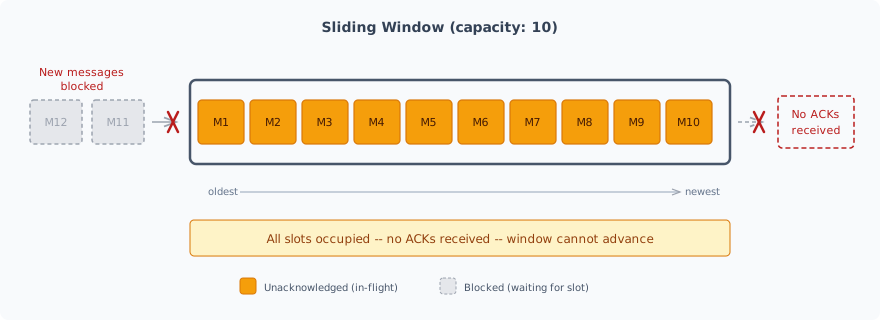
The resolution then is to add a timeout check, so we can catch when a message has overstayed. (And we know immigration authorities are really adept at this task). I’ll present two methods of timeout checks.
Attaching a Timeout to every message #
Each time a message is sent into the window, we start a timer process. If the message exits the window before that, we can cancel the timer. Realising this in Golang would be starting a goroutine (Go’s lightweight thread, much cheaper than an OS thread but not free) for each message’s timer, and then cancelling an associated context when the message exits. However, a large window would translate to a large number of active goroutines.
A single Timeout for the whole window #
The alternative is to start one ticker that runs, and check the age of the oldest message at regular intervals (e.g. every 10 seconds). However, this means that the longest amount of time a message can be stuck is approximately 2x, where x is the monitoring interval. This could be bad for services that require responsiveness in reporting faults.
Remarks #
The problem is that programming solutions are only optimised if you understand your operational context. For instance, if you have multiple messages that repeatedly flow through the window, then the latter method would be better due to the high costs of starting multiple goroutines. However, if you have sparse message flow that is very important (e.g. in a monitoring system reporting fatal problems), then the former method would be better.