During my internship at DSO National Laboratories, I worked on binaries in Windows OS. I’d like to share some of the interesting things that came up during the project.
Portable Executable (PE) Files #
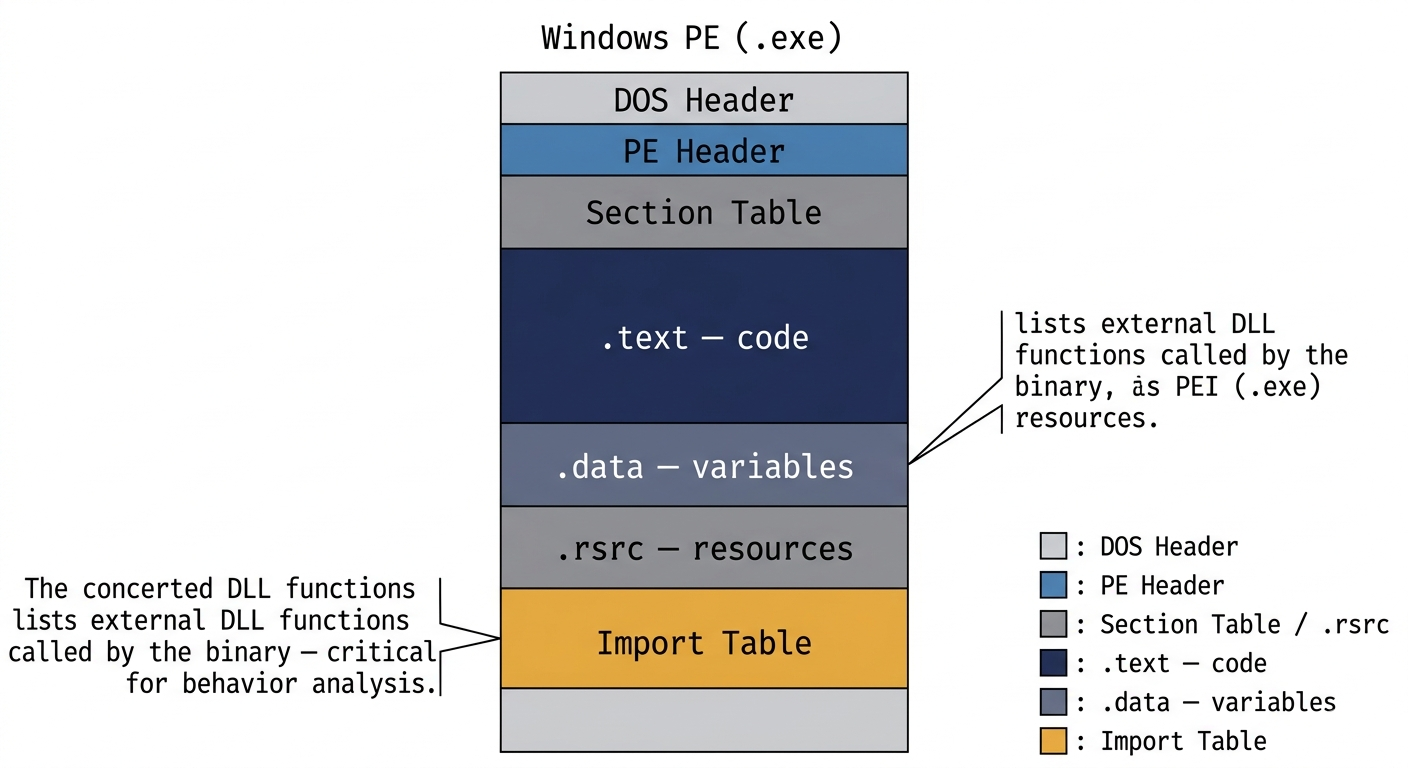
PE files are .exe or .dll (library) files in the Windows OS. In Linux, the equivalent would be ELF.
In order to understand the malware behaviour, we had to learn about PE file formats (such as the DOS stubs, sections, and most importantly the import table - which can tell us about the external dependencies of the code at a glance).
You can do interesting things by manipulating file formats, and this is known as PE malformation.
Packer Detection #
Most malware is packed. Packed files look like encrypted files, but they are self-running (i.e. self-unpacking). On the other hand, encrypted files need some decryption keys before they can be usefully executed.
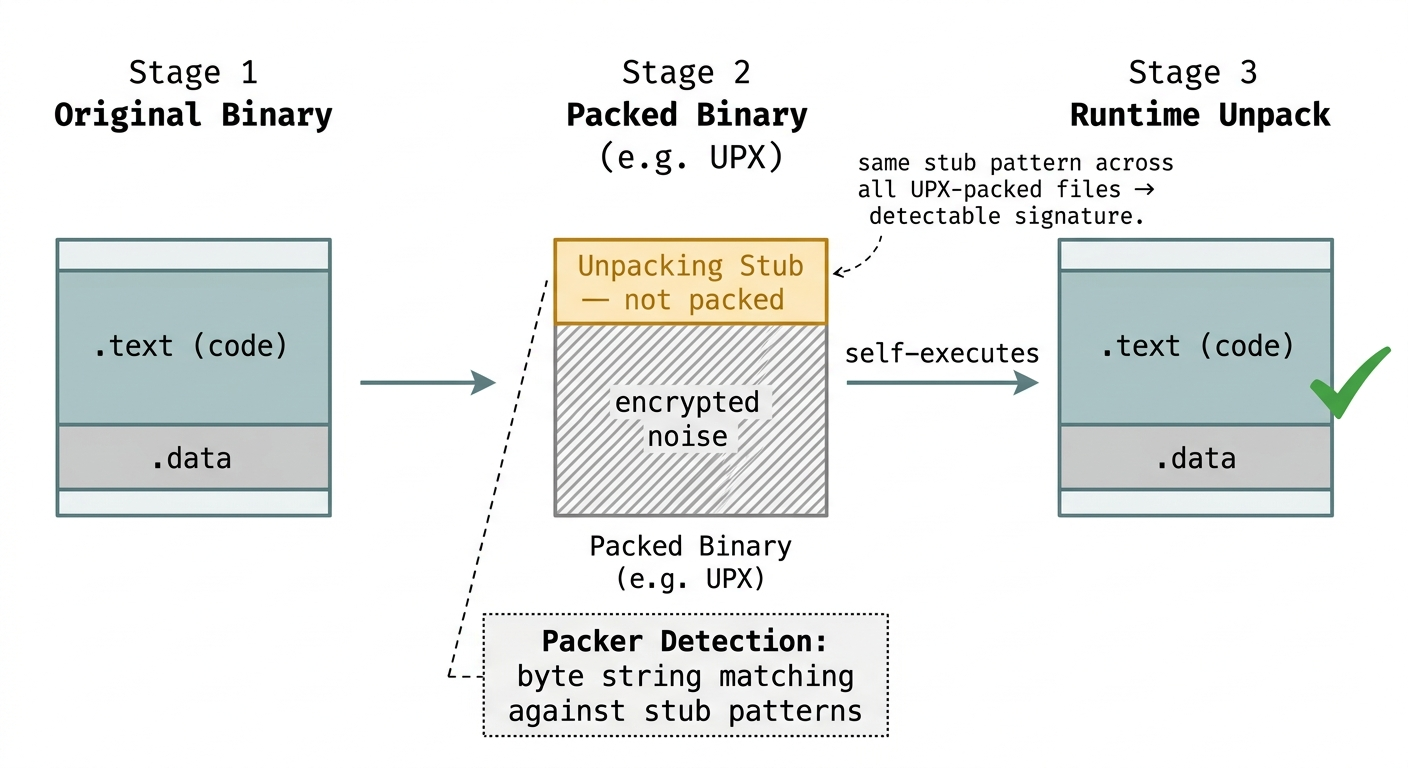
Since these files are self-unpacking, the unpacking code is not packed. Files packed with the same algorithm (e.g. Ultimate Packer for eXecutables or UPX, a common open-source packer) would have a very similar unpacking algorithm. Then, these unpacking algorithms can be used to identify malware.
I looked at how packer detection tools work and the patterns that they detect. Most common packer detection tools use a simple byte string matching (with wildcards). It then becomes possible to do assembly-level changes to the instructions that can change the byte string without affecting the behaviour. Once the byte string changes, the sequence scanners fail to detect matches.
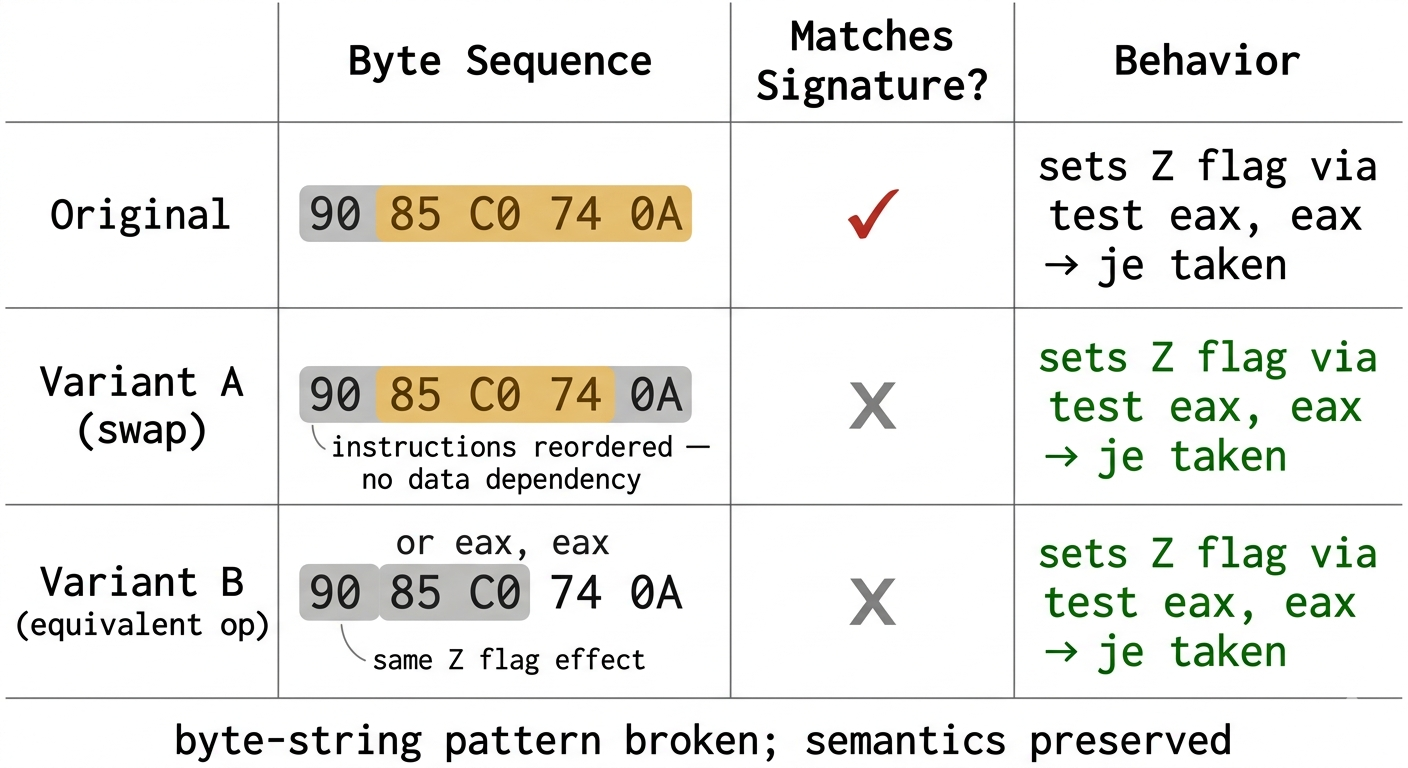
For example,
- Swapping the position of two instructions with no dependencies
- Replacing instructions that have the same effect (e.g.
test eax, eaxandor eax, eax, both set theZzero flag which is used by a succeedingjeinstruction. Either can be instruction used to jump to the same branch of code)
These patterns can be automatically generated, which would benefit both the malware authors and analysts. On one hand, malware authors can generate variants of the code, hoping one of them will not be detected. On the other hand, malware analysts can generate variants of the code to more comprehensively detect these small changes made to the packed file.
Anti-Debugging #
Debuggers are often used to break apart the inner workings of malware.
The suite of techniques used to counter debuggers are known as anti-debugging techniques. These techniques can be classified into 3 categories:
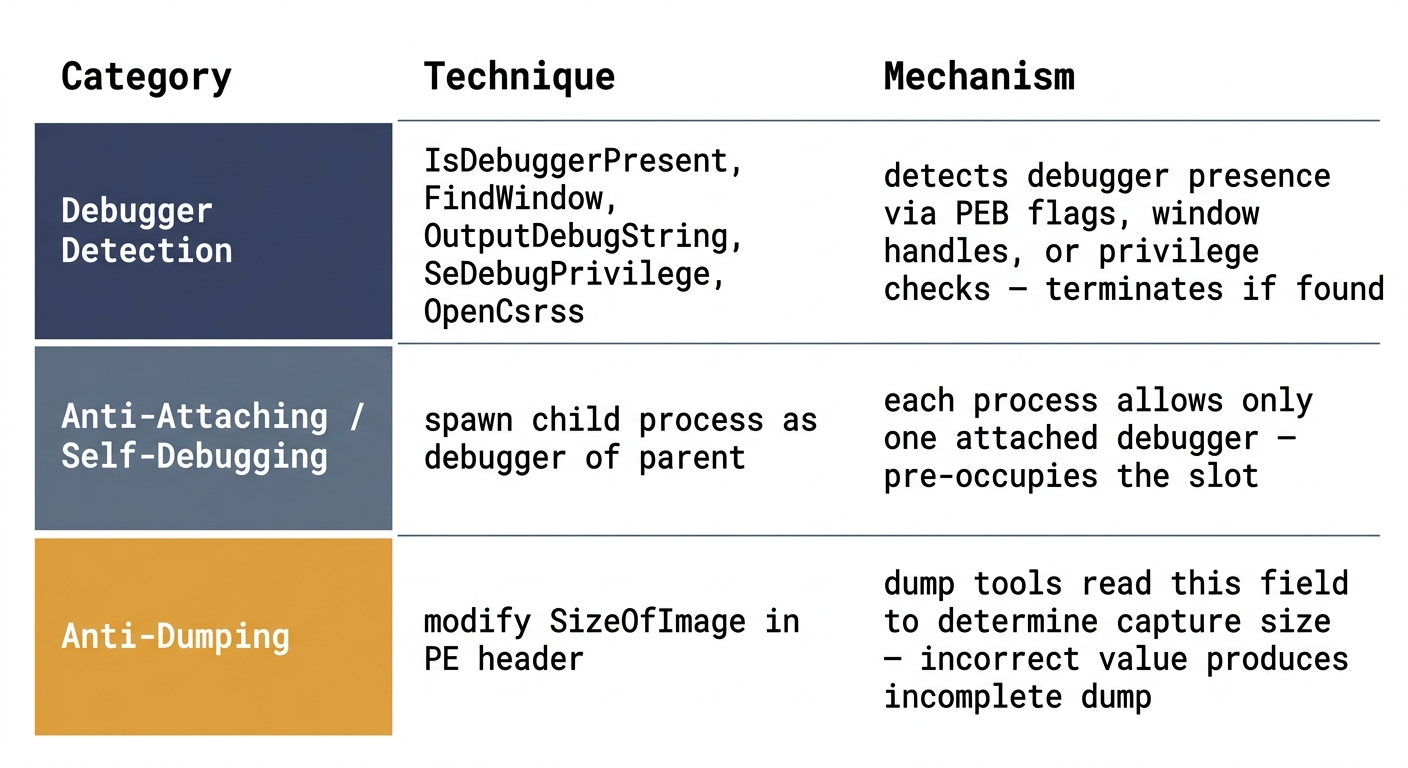
Debugger detection: detect the presence of debuggers, and terminate the program if a debugger is present.
IsDebuggerPresent: A Windows API call that returns theBeingDebuggedflag in theProcess Environment Block (PEB), which contains Windows runtime metadataFindWindow: A Windows API call that checks for the name of window handlersOutputDebugString: An exception-based method; without a debugger, this method is expected to raise an exceptionSeDebugPrivilege: Checks forSE_DEBUG_PRIVILEGEin the process token. This privilege is only open to processes in elevated mode (“run as administrator”), such as debuggersOpenCsrss: Indirectly checks forSE_DEBUG_PRIVILEGE, as theClient/Server Runtime Subsystemprocess can only be accessed by privileged processes
Anti-Attaching/ Self-Debugging: each process can only have one debugger invasively attached to it. The idea then, is to spawn your own child process that debugs the parent process.
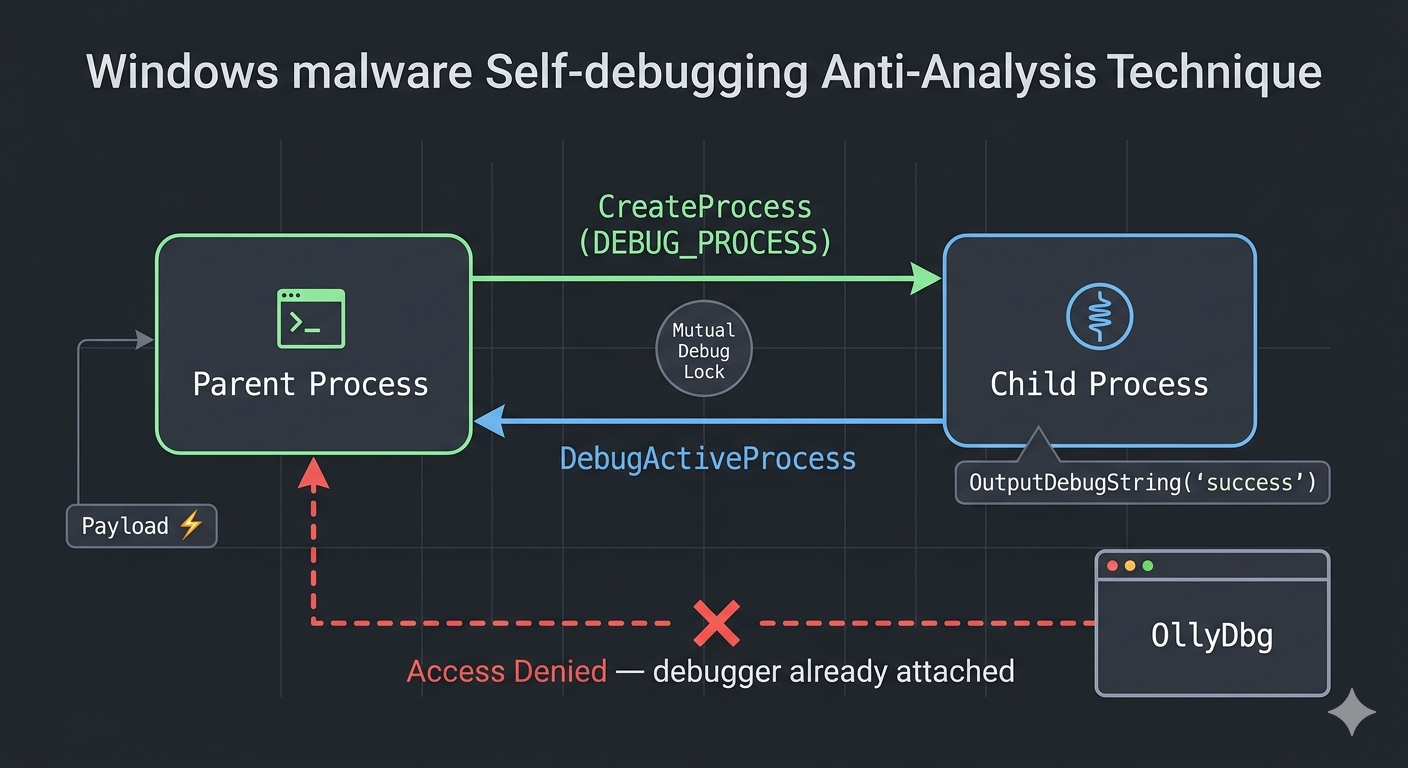
- Of course, analysts can detach the debugger via kernel debugging
Anti-Dumping: Dumping executables is common in reconstructing import tables in packed files. To thwart this process, the SizeOfImage in the PE file can be modified. Dumping tools might not correctly determine how much memory should be captured, causing incomplete dumps.
Remarks #
- Packing is a legitimate tool used to limit reverse-engineering. Think of Android APK files, they are difficult to reverse engineer to protect the intellectual property of developers.
- Most of the techniques described have operating system-specific behaviour (e.g. Windows XP vs. Windows 7 vs. Windows 10), which I studied in detail.
For a full report, do refer here. I also made a short presentation here.